Instructions and TroubleshootingUpdated 2 months ago
OVERVIEW
| PROBLEM | POSSIBLE SOLUTION | INSTRUCTIONS |
| My machine is new or stored for some time and no water is coming through. | De-air the machine by running the de-airing process a few times to get water into the pipes. | 1. De-airing |
| A large amount of water is leaking into the capsule container. | Descale the machine, clean the filter plate, and remove and clean the nozzle. | 4. Cleaning the nozzle |
| Less coffee than usual comes out of the machine. | Perform a factory reset to clear the memory function. | 2. Change the cup size 3. Factory reset |
| The lights are repeatedly blinking 5 times after switching on the machine. | This is the descaling alarm which triggers after1200 brewings. Perform the descaling procedure. | 5. Descaling |
| Both lights are flashing continuously and the machine is not attempting to pump water. | The machine is most likely overheated. Allow it to cool down for a while before continuing. | |
| A small amount of water is found in the capsule container. | A little water is completely normal. It usually comes from the capsule after brewing, or from the capsule inlet after brewing only water. |
1. De-airing
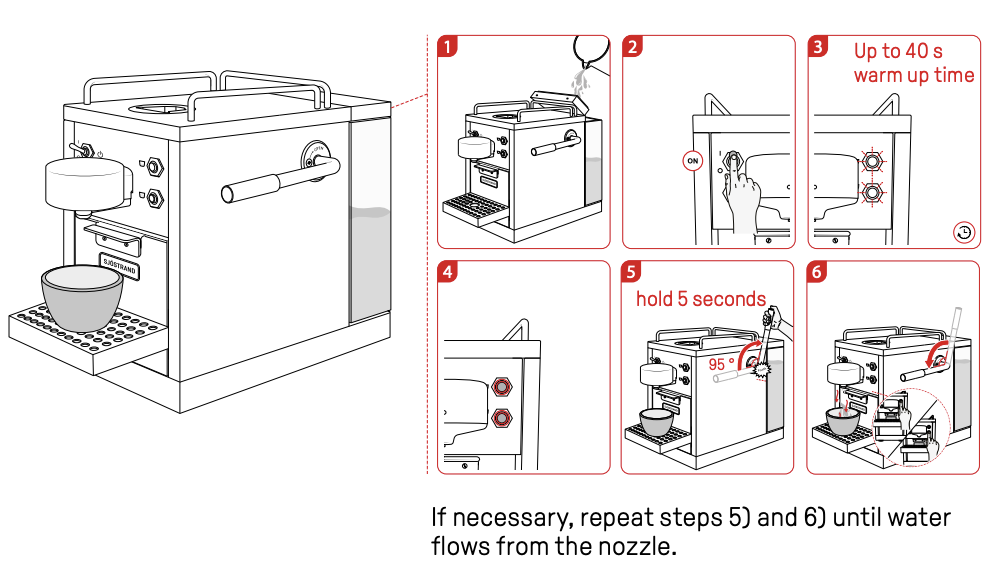
When your machine is new or has been stored for a longer time, there might be no water left in the pipes. When this is the case you will only hear the pump when trying to brew a cup, but now water is coming out of the nozzle. To solve this, follow the following process:
- Fill the machine with water and place a cup on the drip tray
- Switch the machine ON
- Wait for ca. 40 seconds
- The lights will be light
- Put the lever in the upright position and push it further back a bit for a few seconds
- Press a button to brew a cup wit the lever open to see that water comes into the capsule inlet
- Repeat step 5 and 6 up to five times until you hear and see water splashing into the capsule inlet
- Close the lever and press a button to start the cup brewing - when water comes out of the nozzle, the de-airing process is completed
2. Change the cup size
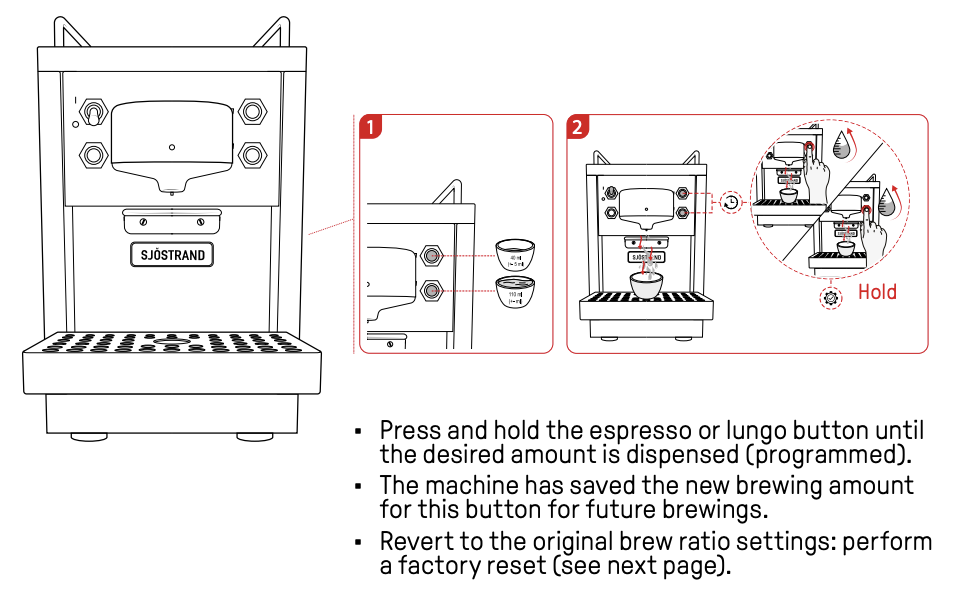
You can reprogram the amount of coffee coming out for each button. Do this by keeping the button pressed until the desired amount is reached. You can use the factory reset function to restore the original cup size volume.
3. Factory reset
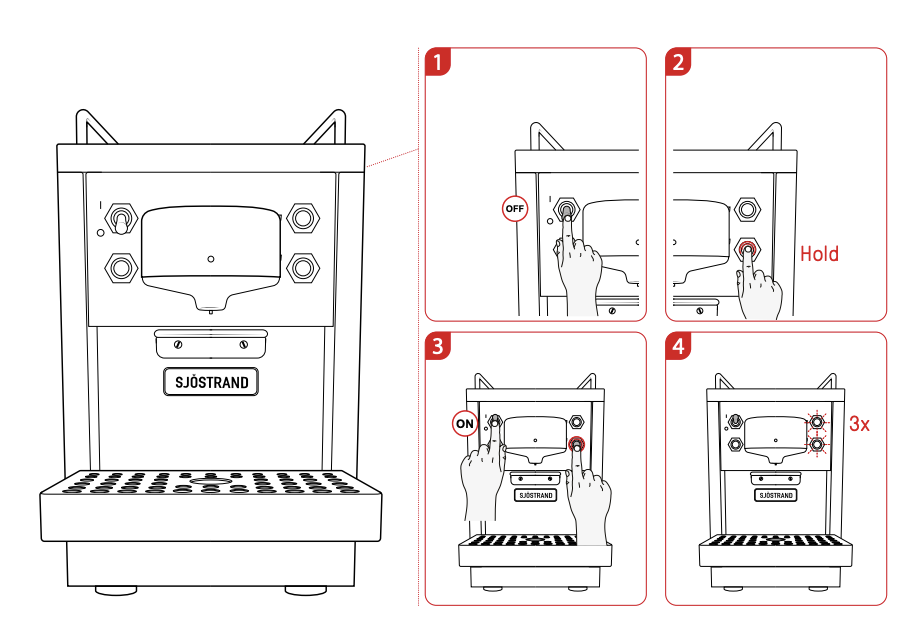
Restore the to the original amounts (40 ml Espresso, 110 ml Lungo) by performing a factory reset:
- Turn the machine OFF
- Press and hold the lungo button
- Switch the machine ON (while keeping the Lungo button pressed)
- The lights will rapidly blink 3 times.
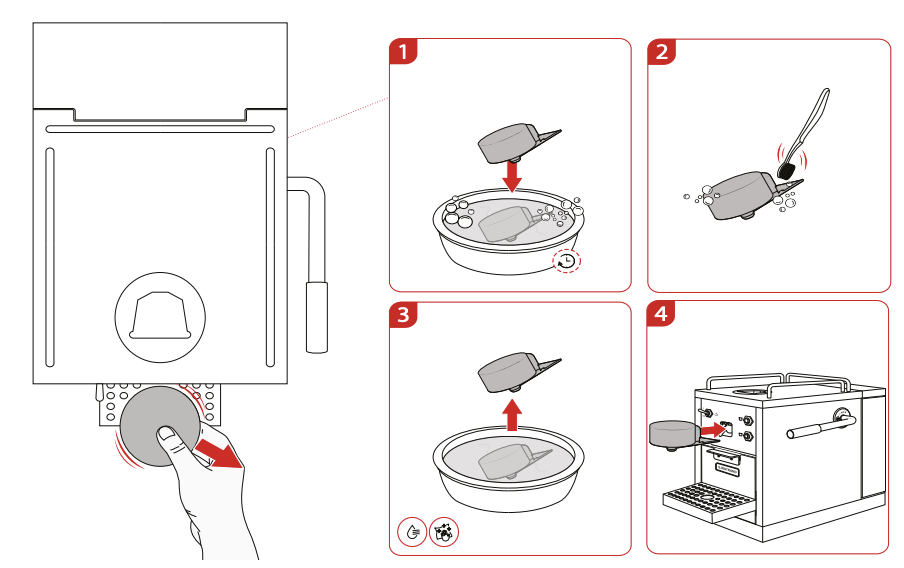
4. Cleaning the nozzle
Cleaning the nozzle is recommended after 1-2 years of use to clean it from coffee residues. To remove the nozzle, pull the nozzle to the side away from you (while it might sound like it, the snap hooks will not break):
- Soak the nozzle in some dishing liquid solution
- Brush it from the inside to clean it
- Wash it in clean water
- Reinsert it by pressing it back into postion
To keep your nozzle clean without removing it you can use our cleaning capsules. They also remove grease and clogging of the filter plate and brewing chamber.
5. Descaling
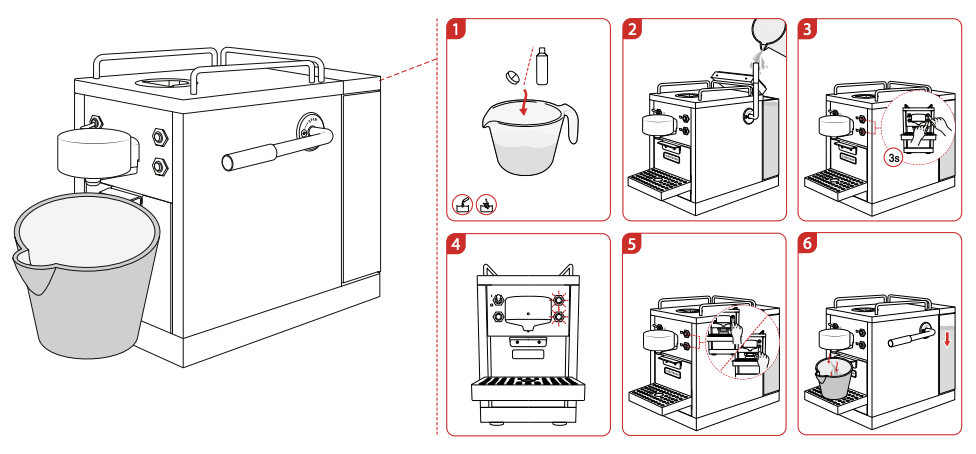
Descaling your machine is a necessary part of keeping it fresh and ensuring the best-tasting coffee. Not descaling your machine can also lead to issues. For example, the machine can start leaking if the coffee cannot flow through it properly. The descaling process with Sjöstrand Descaling Tabs goes as followed:
- Dissolve the descaling tab in 500 ml warm/hot (not boiling) water and stir thoroughly till it is dissolved.
- Add the solution to the water tank and add cold water till the top.
- Start the descaling procedure by pushing both buttons simultaneously for 3 seconds.
- Both buttons will start blinking
- Press either button to start the process
- The machine will keep on running until there is no more water left to pull
- Rinse the machine by running at least about half a water tank (minimum 500 ml) of fresh water through the machine. You can do this again by starting the descaling procedure and interrupt it by pressing a button when completed.The rinsing is completed when the water coming out of the nozzle is clear and not longer foamy.
- Switch the machine off or press a button to end the procedure.